
1) Audit: find what’s wasting budget
I review the entire account—campaigns, ad groups, keywords, ads, audiences, and tracking—and compare everything to your business goals. I make sure your most important products or services are getting the right budget. I also keep brand and non-brand separate so the data stays clear.
Then I follow the money. I remove wasted spend from Search Partners and Display placements, check devices and hours that don’t perform, and review search terms to see what people actually mean—not just what matches. The goal is simple: cut waste and focus budget on what works.

In this screenshot, you can clearly see the budget leak.
Computers spent over AED 32,000 and tablets spent money as well — both with zero conversions. Meanwhile, mobile drives all 141 conversions.
This tells us the budget is going to devices that aren’t producing results. In a case like this, I either work on improving desktop performance or shift that spend into mobile where conversions are already happening.
A simple device adjustment like this alone can often improve results by 20–30%
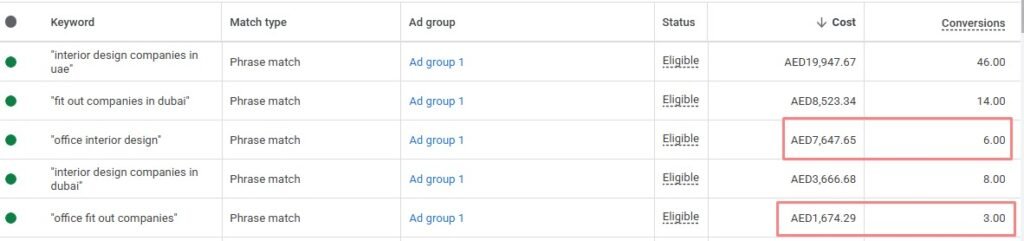
I also filter keywords by total spend to find the hidden budget drains — the ones that look relevant but don’t actually bring enough leads.
In this example, keywords like “office interior design” and “office fit out companies” are spending thousands but generating only a handful of conversions. When I compare them to stronger performers like “interior design companies in uae,” the cost per lead is much higher.
They aren’t completely wrong keywords — they’re just not efficient.
When I see this, I either lower the bids, tighten the match types, or pause the weak ones and move the budget into the terms already producing solid results. Small keyword cleanups like this can quickly reduce overall cost per lead and improve performance fast.
2) Regain Control (turn off Google’s autopilot)
After the audit, my priority is simple: take back control of the account.
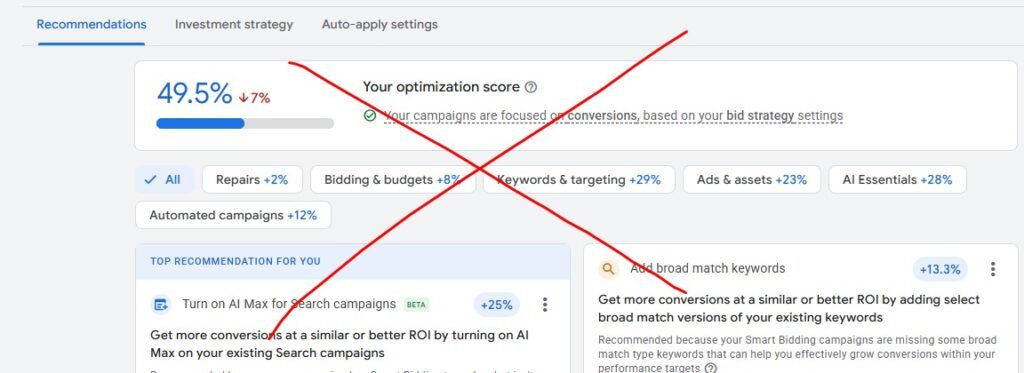
I switch off auto-applied recommendations, stop chasing the “optimization score,” and focus only on changes that actually help the business. A high score means nothing if it doesn’t increase leads or reduce cost per conversion. My job isn’t to follow Google’s suggestions blindly — it’s to evaluate them properly.
In many accounts, automation has quietly adjusted bids, added keywords, or changed settings in the background. Over time, that creates messy data and higher costs.
At this stage, I clean everything up. I make sure every setting, bid strategy, and targeting choice supports your goals — not Google’s. Once the account is stable and the data is reliable again, I move into the rebuild phase with a clear, focused plan.
3) Campaign Structure: Built to stay simple
When I structure a Google Ads account, I keep it focused and intentional. I don’t build big for the sake of looking advanced. The setup always depends on budget, demand, intent, and market size. A $5K/month account doesn’t need the same structure as a $100K/month one. I scale structure with spend — not with ego.
I create a small number of clear, focused campaigns. Each ad group has one theme and targets high-intent keywords. The ads directly match what the searcher wants. I keep proven campaigns separate from tests so experiments never damage steady performance.
My goal is clarity. You should be able to open the account and understand it quickly. And I should be able to optimize it without guessing.
I separate brand from non-brand. I separate “call now” or “book today” searches from research terms like “price” or “reviews.” Different intent deserves different control.
Once campaigns are live, I grow them carefully:
-
I increase budget on what converts.
-
I split out strong patterns into their own groups.
-
I keep things small until results justify expansion.
-
I cut what wastes spend.
-
I avoid unnecessary keyword clutter that drives up costs.
I build the foundation first, then scale up step by step. A clean structure makes Google’s learning phase work better — and makes scaling smoother when performance improves.
4) Optimization: steady, goal-focused improvement
When I optimize an account, I concentrate on the areas that actually move results: ads, keywords, and landing pages. Everything I do ties back to lowering cost per lead and improving lead quality.
1. Choosing the right campaign type
Many service businesses rely on Performance Max or fully automated campaigns. For lead generation, that often means less control and mixed lead quality. I prefer structured Search or Call campaigns where I decide which queries trigger ads and how budget is distributed. With tighter control, lead quality usually improves quickly.
2. Refining keyword traffic
During the first few weeks, I review every search term that triggered ads. I keep the ones that show strong intent and block the ones that don’t. More importantly, I block patterns behind bad traffic — like “free,” “cheap,” or “how to do it yourself.” This prevents wasted spend from creeping back in and keeps the budget focused on people ready to act.
3. Improving the landing experience
Paid traffic needs a focused destination. Sending visitors to a general website often lowers conversions. I use simple, action-driven landing pages with one clear goal — call or submit a form. The message on the page matches the ad and the keyword, creating consistency. When everything aligns, Quality Score improves, clicks cost less, and conversions increase.
How I manage optimization week to week
- I review performance weekly and adjust budgets toward top performers.
- I pause or adjust weak keywords and add new negatives.
- I refresh ad copy to prevent fatigue and test new angles.
- I run A/B tests on headlines, offers, and layouts to see what connects best.
- I test small changes in positioning — like urgency, guarantees, or tone — because small shifts can significantly lift conversion rates.
Once enough reliable data is collected, I transition to smart bidding strategies like Target CPA or Maximize Conversions. At that point, automation works for us — scaling based on proven performance, not guesswork.
5) Reporting
I don’t rely on bloated agency dashboards or overcomplicated reports.
Instead, I send you a clear screenshot of the dashboard data so you can see exactly what’s happening — spend, conversions, cost per lead, and calls. No inflated metrics. No vanity numbers.
Just real performance data, presented simply.
You’ll always know what’s working, what’s not, and where your money is going.